
Comfort by Mitsubishi Electric
Mitsubishi Electric USHouse & Home
4.31.37K Reviews
- Version
- 3.5.0
- Installs
- 50.00K
- Age Rating
- Everyone
Screenshots
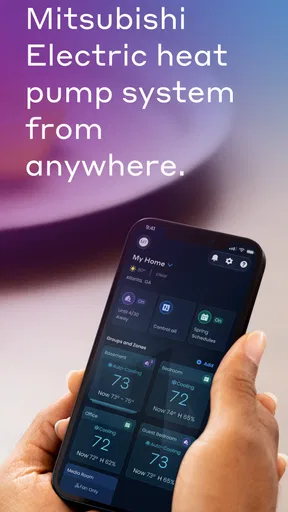
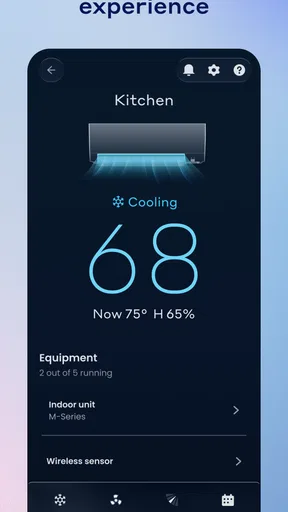
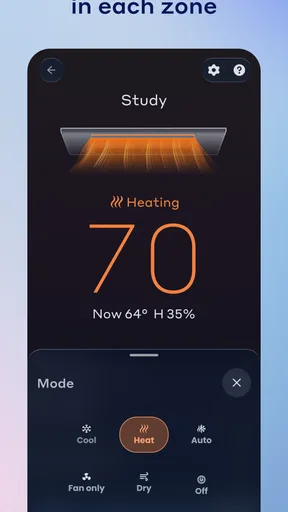
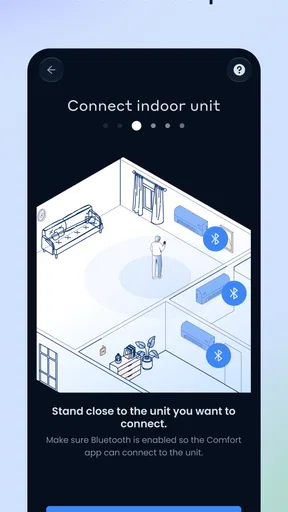
Our Review of Comfort by Mitsubishi Electric
 Analysis by Appyee
Comfort is the kind of House & Home app I notice most when I am not thinking about it. Its purpose is simple: it lets me control compatible Mitsubishi Electric HVAC systems from a smartphone or tablet. That sounds modest, but remote climate control can make a real difference when I am leaving work, settling into bed, or trying to avoid walking through the house just to change the temperature.
I approached it less like a novelty remote and more like a daily household tool. The important question is not whether an app can replace a wall controller; most connected HVAC apps can do that. The better question is whether it gives me useful control without creating unnecessary friction, unclear account decisions, or a confusing setup experience. My overall impression is positive, with one important condition: it makes the most sense for people who already use a compatible Mitsubishi Electric system. It is not a universal climate-control app for every home.
What using Comfort feels like in a real home
The app comes from Mitsubishi Electric US and has been available since Aug 25, 2015. That long presence gives it a more established feel than a brand-new companion app, while the current version, 3.5.0, shows that it remains maintained as part of the company’s connected HVAC offering. It is free, aimed at Everyone, and works on Android 7.0 or later. On the store, it has a 4.3 average from around 2.8 thousand ratings, with more than 50 thousand installs.
Those figures do not tell me whether the app will work perfectly in a particular home, because compatibility depends on the Mitsubishi Electric equipment and its connected setup. They do suggest that Comfort is not an obscure experiment. I would still check the HVAC model and the required connection hardware before planning a purchase around it. The app’s value begins only after the system itself can communicate with it.
In ordinary use, I see the main benefit as reducing small interruptions. Imagine coming home after a warm afternoon. Instead of entering a room that feels uncomfortable and waiting beside the indoor unit, I can use the phone to prepare the space before I arrive, provided the HVAC system is already connected and available. The same idea works in reverse: if I leave and realize the system is still running, I can check it without turning around.
That convenience is more meaningful in homes with several indoor units or rooms that are used at different times. A traditional remote is usually tied to the room where it is kept. A phone is already with me, so I can manage the system while I am in another part of the house. This is especially useful when the indoor unit is upstairs, behind furniture, or in a room I do not want to enter while someone is sleeping.
The strongest reason to use it is remote access
Comfort is most convincing when I treat it as an extension of the HVAC system rather than as a standalone smart-home platform. The phone becomes a convenient control point, but the Mitsubishi Electric equipment remains the center of the experience. That distinction matters because it sets a realistic expectation: the app is valuable for operating the supported system, not for turning unrelated heating or cooling products into connected devices.
I also like the practical safety of being able to review the system before leaving for a trip or after a distracted morning. A wall controller cannot answer that question once I am away. The app can make checking easier, although I would not treat a phone command as a substitute for sensible preparation. If the home has unusual equipment, multiple zones, or a setup shared by several people, I would test the arrangement at home before relying on it remotely.
One useful habit is to use the physical controller and the app together during the first few days. I would change one setting locally, then confirm how it appears in Comfort. That simple comparison helps reveal which controls are mirrored clearly and which actions are easier from the wall unit. It also prevents a common mistake: assuming that every function available on a dedicated HVAC controller must appear in exactly the same way on the phone.
Control is useful only when the setup is clear
The first real test is not changing the temperature. It is getting the system into a state where the app, the HVAC equipment, the home network, and the user account all agree. A connected climate app can feel unreliable when the underlying issue is actually a weak network connection, an incomplete pairing step, or a unit that has not been added correctly.
I would approach setup patiently rather than trying to complete it while rushing out the door. Keep the HVAC model information nearby, use the home network that the system expects, and give each connection step time to finish. If the app asks me to sign in or create an account, I want to understand what that account controls before accepting every prompt automatically. A clear account path is part of a trustworthy smart-home experience.
Once connected, I would test three situations: controlling the system while standing near it, controlling it from another room, and checking whether the app reflects a change made with the physical controller. I would also close and reopen the app before deciding that the status display is dependable. These tests are not glamorous, but they expose the difference between a useful household tool and an app that only appears convenient in ideal conditions.
There is another trade-off here. A dedicated remote is usually faster for a single adjustment because it is always associated with one unit and does not require unlocking a phone. Comfort becomes better when I need distance, visibility across rooms, or a quick check while away. For a person who only changes the temperature from the sofa, the app may feel unnecessary. For someone who manages several zones or frequently forgets the system after leaving, the balance shifts in its favor.
Where privacy and account choices deserve attention
Because Comfort controls equipment in my home, I would pay attention to every permission and account screen during installation. I do not assume that a climate-control app needs broad access to everything on my phone. If the operating system requests access, I would read the wording and decide whether it is relevant to the connection method I am using. I would also revisit permissions later instead of treating the initial setup as a one-time decision.
This is not a claim about hidden data practices; it is a practical way to keep control. A user should be able to distinguish between what is required to operate the HVAC system and what is optional for convenience. I would avoid granting access simply because the setup process is moving quickly. If a permission is declined, I would check whether the app still performs its core control functions before deciding whether the extra access is worthwhile.
Account control matters for shared homes too. If several people need to operate the HVAC system, I would decide who owns the primary account and how access should be handled when someone moves out or stops using the system. I would not casually share a personal password. A household device can outlast a phone, relationship, tenancy, or guest arrangement, so the account structure deserves the same care as the physical equipment.
Before handing over a phone or selling it, I would sign out of Comfort and remove any saved credentials. If I replace the HVAC equipment or change the home network, I would review the connected setup rather than assuming the old arrangement has disappeared automatically. These are simple steps, but they protect user agency better than relying on the app to make every lifecycle decision for me.
Everyday workflows that make the app worthwhile
My favorite use case is the “before I arrive” routine. I would check the current state while commuting, choose an appropriate setting, and then leave the phone alone. The benefit is not constant monitoring; it is avoiding the need to remember one more task when I get home. I would use this sparingly and sensibly, especially if the home is empty for long periods.
A second useful workflow is the bedtime check. Before going to sleep, I can confirm that the system is operating as intended without getting up again later. In a house with separate indoor units, this can be more convenient than visiting each room. I would still verify the physical controller during the first week, because learning how the app represents multiple units is more important than assuming every room behaves identically.
A third is the departure check. When I am already outside, Comfort can be useful for confirming the status of the HVAC system. This is one of the clearest differences from a normal remote. The phone is not merely another set of buttons; it gives me a chance to correct an absent-minded decision from a different location, assuming the connected system is reachable.
There is also a quieter benefit for households where one person manages the equipment but another person uses the room. A phone can make adjustments without requiring someone to explain every button on a wall controller. That does not remove the need for agreement about comfortable settings, but it can reduce small conflicts caused by a remote being misplaced or left in another room.
What I would not expect from Comfort
I would not choose this app if I need one control center for HVAC products from many manufacturers. Its purpose is tied to Mitsubishi Electric systems, so a mixed-brand home may be better served by a broader smart-home solution if that solution genuinely supports the equipment involved. The broader option may offer a more unified dashboard, while Comfort is likely the more direct choice for a compatible Mitsubishi Electric installation.
I would also skip it if I strongly prefer not to use an account-connected control method. A physical controller is simpler in that respect: it stays in the home, has no phone battery problem, and can be used by visitors without explaining an app. Comfort makes sense when remote access and phone convenience matter enough to justify the extra layer.
Travelers and landlords should be especially deliberate. I would not give casual guests unrestricted access to a household account, and I would not assume that every resident needs the same level of control. If the system serves a rental property, I would establish a clean handover process before a tenant changes. The app can be convenient, but convenience without clear ownership becomes a maintenance problem.
People using older Android phones should also check the operating-system requirement before spending time on setup. Comfort supports Android 7.0 and later, which covers many devices but not every phone still in circulation. On iOS or Android, I would keep the app updated when practical, but I would test important controls after an update rather than discovering a change during an urgent situation.
My view on reliability, clarity, and user control
The app’s greatest strength is focused usefulness. It connects the Mitsubishi Electric HVAC experience to a device I already carry, and that can remove several small annoyances from daily life. I value the ability to check a system remotely more than decorative smart-home features. The free price also lowers the barrier for owners who already have compatible equipment and simply want the official mobile control option.
Its weakness is that the experience depends on more than the app itself. The HVAC model, network, phone, account, and home layout all influence how satisfying it feels. When something goes wrong, the user may have to work out whether the issue is the app, the connection, or the equipment. That uncertainty is the main reason I would keep the physical controller available and avoid making the app my only way to manage the home.
The rating of 4.3 is encouraging, but I would read it as a sign of generally useful ownership experiences rather than a guarantee for every installation. Reviews for connected HVAC apps often reflect the complete setup, not just the interface. A person with a straightforward compatible system may have a very different experience from someone combining several indoor units, an unusual network, or a shared household account.
For trust, I prefer visible choices over assumptions. I would inspect permissions, use the smallest access that still enables the controls I need, protect the account, and review connected devices when household circumstances change. Those habits do not prove anything about the app’s internal data handling, but they do keep the decisions that are actually available to me in my hands.
Who should install it
I would recommend Comfort to a Mitsubishi Electric owner who wants official smartphone or tablet control, especially someone who regularly checks the HVAC system from another room or away from home. It is also a sensible choice for households with multiple zones, people who want a bedtime or departure check, and anyone who often forgets to adjust the system before leaving.
I would be more cautious for a person who rarely changes settings, dislikes account-based services, uses a mixed collection of HVAC brands, or has no interest in remote access. In those cases, the standard controller may be quicker and less complicated. The app is not automatically better simply because it is connected.
My final recommendation is to install it when the Mitsubishi Electric system is compatible and remote convenience solves a real problem in your routine. Start with a careful setup, test local and remote behavior, review permissions instead of accepting them blindly, and keep the physical control method familiar. With those expectations, Comfort is a practical House & Home app from Mitsubishi Electric US rather than a gimmick. Its best feature is giving me useful control without asking me to be in the same room as the HVAC system.
Verdict
Strengths of Comfort by Mitsubishi Electric
- Remote control of compatible Mitsubishi Electric air conditioners
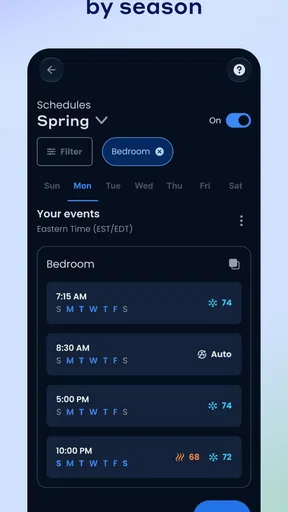
- Scheduling helps automate cooling and heating routines
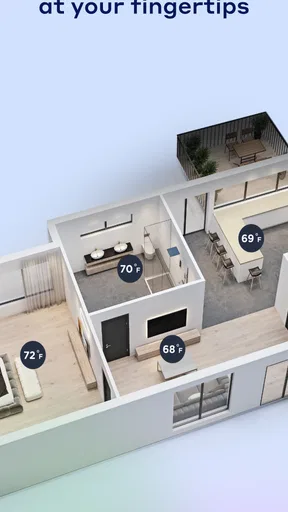
- Displays indoor temperature and selected operating settings
- Supports multiple connected units in one app
- Useful notifications can alert you to certain system conditions
Limitations of Comfort by Mitsubishi Electric
- Requires a compatible Mitsubishi Electric unit and Wi-Fi adapter
- Initial setup may be confusing for less technical users
- Some features vary depending on the air conditioner model
- Remote access depends on a stable internet connection
- App performance and interface may differ across mobile devices
Similar Picks in This Category
View All
Universal TV Remote Control
CodeMatics Media Solutions3.9

AlfredCamera Home Security app
Alfred Systems Inc.4.7

Planner 5D: AI Home Design
Planner 5D4.5

Universal Tv Remote-Cast to TV
One Music Player4.1

Zillow: Homes for Sale & Rent
Zillow Group4.8

99acres Buy/Rent/Sell Property
infoedge.com4.3
Frequently Asked Questions
What is Comfort by Mitsubishi Electric?
Comfort by Mitsubishi Electric is a companion app designed to help users monitor and control compatible Mitsubishi Electric air-conditioning and heating systems from a smartphone or tablet. Depending on the installed equipment, it may let you adjust temperature, operating mode, fan speed, and schedules, as well as check the system remotely. Features can vary by country, product series, and connected controller.
Which Mitsubishi Electric systems are compatible with the app?
Compatibility depends on the exact Mitsubishi Electric indoor and outdoor units, Wi-Fi interface, controller, and region where the equipment was purchased. Not every air conditioner or heat pump can connect directly. Before downloading, check the official compatibility list and confirm that your system supports the required Mitsubishi Electric cloud service or Wi-Fi adapter. An installer may also need to configure the hardware.
What can I do with Comfort by Mitsubishi Electric?
After a compatible system is connected, the app can provide convenient remote controls for everyday comfort. Typical options include turning the unit on or off, changing the target temperature, selecting cooling, heating, fan, or automatic mode, and adjusting airflow settings. Some models also support weekly timers, room or energy information, notifications, and control of several units, although available functions differ by model.
Does Comfort by Mitsubishi Electric require an internet connection?
An internet connection is generally required for remote access through the app, account services, and communication with Mitsubishi Electric’s cloud platform. Your phone needs mobile data or Wi-Fi, while the air-conditioning or heating unit must be connected to a compatible home network. If the internet is unavailable, basic operation may still be possible using the physical remote control, but app-based remote features can stop working.
Is Comfort by Mitsubishi Electric free to download and safe to use?
The app is normally available as a free download, but using it requires compatible Mitsubishi Electric equipment and may involve creating an account or accepting service terms. It should be downloaded only from the official Google Play Store or Apple App Store. Review the requested permissions and privacy information, and use a strong password because the app may control heating or cooling equipment in your home.
